Short answer: yes. AI can absolutely summarize lectures — and for most students, it's one of the single biggest time-savers available right now.
But "summarizing a lecture" isn't one thing. Depending on whether you're working from a recording, a slide deck, or your own handwritten notes, the right AI approach is completely different. Pick the wrong method and you'll get a vague, unhelpful blob of text. Pick the right one and you can genuinely cut your nightly study time in half.
This guide walks through how an AI lecture summarizer actually works, the key difference between live audio transcription and PDF summarization, and how to choose the best AI for college lectures based on how you take in information.
New to AI study tools in general? Start with our overview of How AI is Changing the Way Students Study in 2026 for the bigger picture.
How does an AI lecture summarizer work?
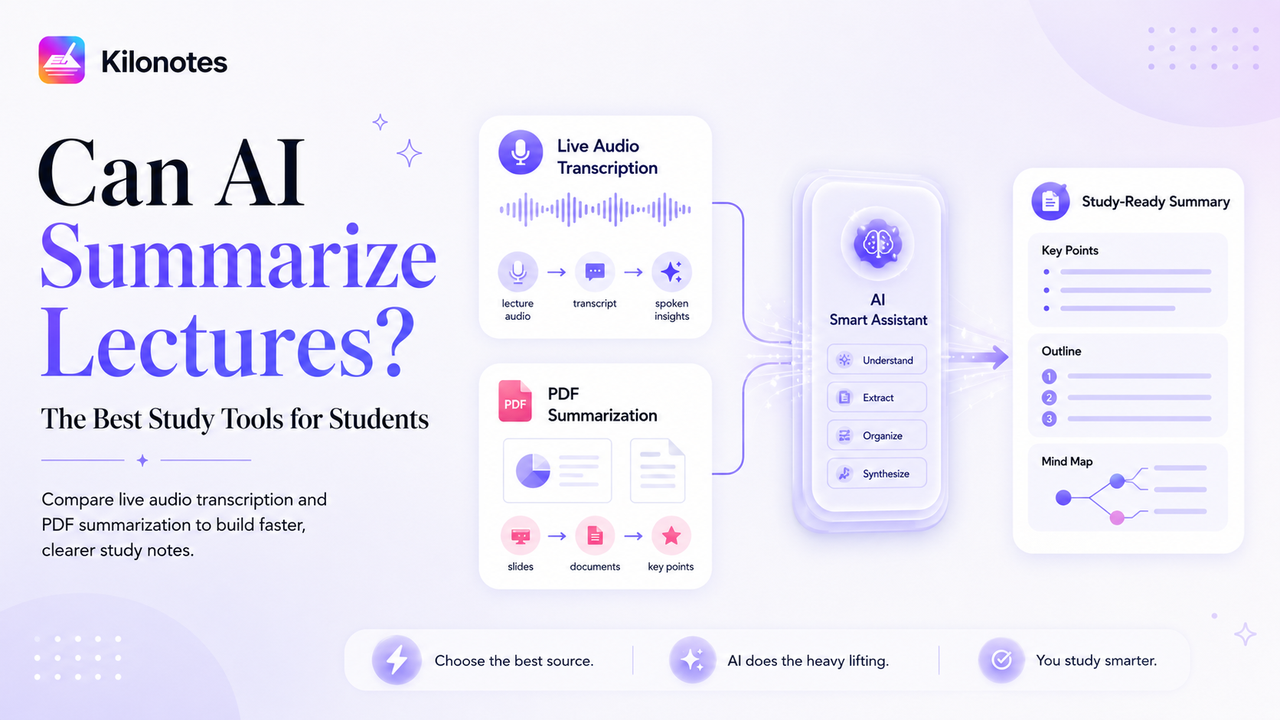
At a high level, summarizing a lecture with AI is a two-step process.
Step one: turn the lecture into text. AI can't summarize sound directly, so the first job is converting your raw lecture — whether it's spoken audio or a stack of slides — into machine-readable text.
Step two: condense and structure that text. Once the AI has a transcript, a large language model identifies the main ideas, strips out the filler ("um, so, as I was saying…"), and reorganizes everything into key points, an outline, or a structured summary.
The quality of the final summary depends heavily on getting step one right — which is where the two main approaches come in.

Live audio transcription vs. PDF summarization
These are the two workhorses of AI lecture summarizing, and knowing which to use is the whole game.
Live audio transcription (summarize audio to text)
This is the approach for lectures, discussions, and seminars — anything where the spoken word carries the information.
You record the class (many apps do this with a single tap), and AI transcribes the audio to text in real time or shortly after. From that transcript, the AI generates a summary. The huge advantage here is that you stop being a stenographer. That matters more than it sounds: research on note-taking shows that frantically transcribing a lecture word-for-word leads to shallower processing and weaker understanding than listening and capturing ideas in your own words.¹ Let the AI handle the verbatim record, and you're free to actually listen, think, and participate.
Best for:
- Fast-talking lecturers you can't keep up with
- Discussion-heavy seminars where key insights come up verbally
- Classes where the slides don't capture what's actually said
- Anyone who learns better by listening than by writing
Watch out for: audio quality matters. A clear recording from the front of the room produces a far better transcript than a muffled one from the back. Background noise, crosstalk, and heavy accents can all reduce accuracy, so always skim the transcript before trusting the summary.
PDF and document summarization
This is the approach for lecture slides, textbook chapters, research papers, and any reading where the information is already written down.
You import the PDF, and the AI reads through it and extracts the key points — distilling a 40-slide deck or a dense journal article into the handful of concepts that actually matter. Because the source is already clean text, these summaries tend to be highly accurate.
Best for:
- Slide-heavy lectures where the deck is the content
- Pre-reading assigned chapters before class
- Condensing long research papers down to their core argument
- Building a study sheet from multiple documents at once
Watch out for: PDF summarizers only know what's on the page. If the professor's most important point was said out loud and never made it onto a slide, document summarization will miss it entirely. That's exactly why the two methods complement each other.
The winning combo: use both together
The students who get the most out of AI don't choose between these methods — they layer them. Record the lecture audio and import the slides, then let AI summarize across both. The transcript captures the verbal nuance and the examples; the slides provide the structure and the definitions. Together they produce a far more complete picture than either could alone.

How to choose the best AI for college lectures
When you're evaluating tools, look past the marketing and check for these practical features:
- Accurate transcription. This is the foundation. A summary built on a bad transcript is worthless. Look for tools with strong audio-to-text accuracy and, ideally, support for academic vocabulary.
- Both audio and document support. The best tools handle recordings and PDFs in one place, so you're not stitching together three different apps.
- Structured output, not just shorter text. A good summarizer gives you outlines, key points, and ideally mind maps — not just a compressed paragraph. Structure is what makes a summary studyable.
- Everything in one workflow. If your recording, your notes, and your AI summary all live in the same app, you save the friction of exporting and re-importing constantly.
- Privacy you can trust. You're feeding these tools your actual coursework. Choose apps that are clear about how they store your data and that don't use your private content to train their models.
A realistic AI summarizing workflow
Here's what cutting your study time in half actually looks like night to night:
- In class: Tap record and import the slides if you have them. Take light handwritten notes for the things you personally want to flag — but stop trying to capture everything.
- After class (5 minutes): Let the AI transcribe the audio and generate a summary across your recording and slides.
- Review (10 minutes): Skim the AI summary, correct anything it got wrong, and add your own connections. This quick review is your active learning — and because it forces you to retrieve and reframe the material rather than re-read it passively, it's the part that actually builds lasting memory.²
- Before the exam: Pull all your AI summaries together into a single revision sheet. No re-watching three hours of lecture footage. No recopying. Just review.
What used to be an hour of mindless transcription becomes fifteen focused minutes — and you understand the material better because you spent that time thinking instead of writing.
This same lecture-capture workflow is the backbone of organized, exam-ready notes. For a method-focused walkthrough, see How to Organize Your College Lectures with Kilonotes.
Bringing it all together with Kilonotes
If you want all of this in a single note taking app built specifically for students, Kilonotes handles the full pipeline: one-tap audio recording, AI transcription, PDF import and key-point extraction, and automatic summaries, outlines, and mind maps — all alongside your handwritten notes.³
For a complete walkthrough of how to record a lecture and turn it into a structured study page in seconds, read our Guide to Kilonotes AI: Transcribe, Summarize, and Ace Exams.
So — can AI summarize lectures? Without question. The only real decision left is which method fits the class in front of you, and whether you're ready to stop spending your evenings recopying notes you'll barely read.
Footnotes
¹ Source: Pam A. Mueller and Daniel M. Oppenheimer, "The Pen Is Mightier Than the Keyboard: Advantages of Longhand Over Laptop Note Taking". Psychological Science. https://journals.sagepub.com/doi/abs/10.1177/0956797614524581
² Source: Jeffrey D. Karpicke and Henry L. Roediger III, "The Critical Importance of Retrieval for Learning". Science. https://www.science.org/doi/10.1126/science.1152408
³ Source: Kilonotes, "Kilonotes — Handwriting Notes App with AI for Students". https://www.kilonotesapp.com/en