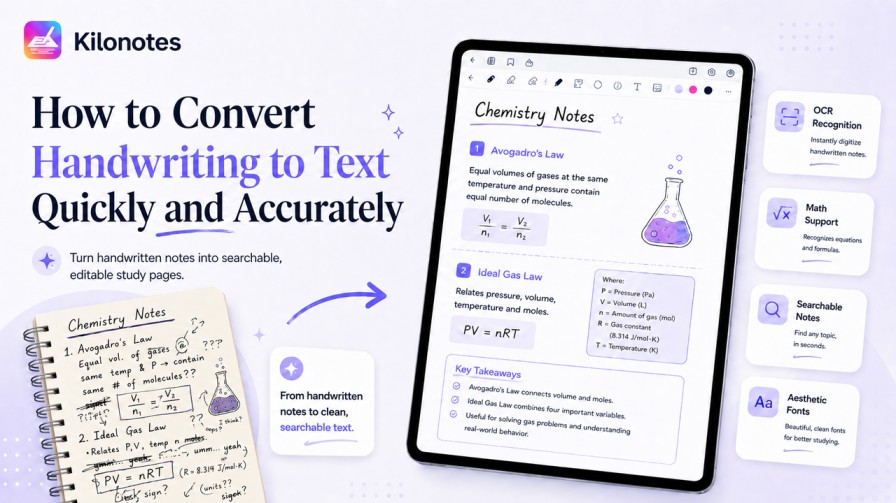
There's a reason so many students still swear by handwriting. Writing notes by hand slows you down just enough to process ideas, and that slower, more effortful processing is exactly why handwritten notes tend to beat typed ones for conceptual understanding and memory.¹ It also gives you total freedom to draw diagrams, arrows, and equations however you like.
But handwriting has one fatal flaw as a study system: it's trapped. You can't search it, you can't easily edit it, and you can't copy a clean paragraph out of it to share with a classmate. Three weeks before finals, "I know I wrote that down somewhere" is not a study strategy.
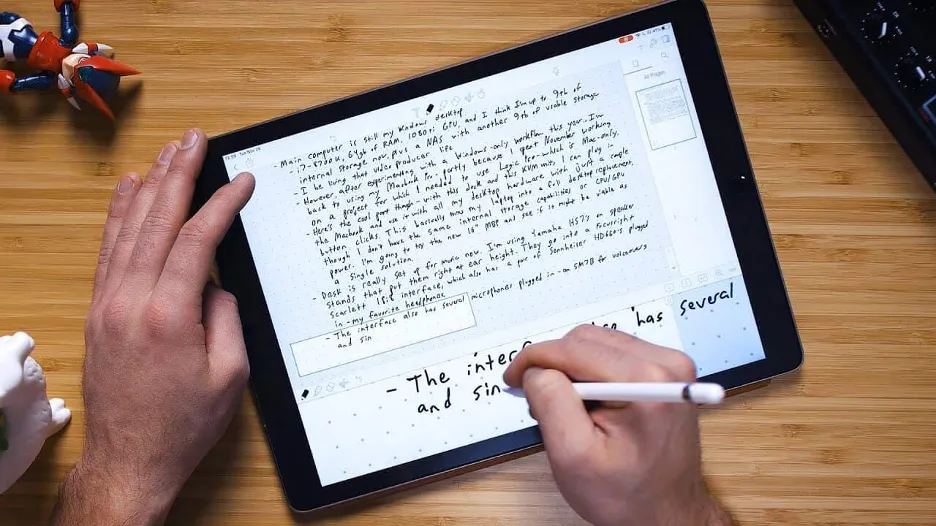
The fix is to convert handwriting to text — to digitize your handwritten notes so they become searchable, editable, and shareable while still letting you write naturally by hand in the first place. This guide explains how the technology works, why it's a genuine study upgrade, and what to look for in an OCR note app.
Curious how this fits into the bigger shift in studying? See How AI is Changing the Way Students Study in 2026.
Why convert handwriting to text at all?
Digitizing your handwriting isn't about abandoning pen and paper — it's about getting the best of both. Here's what you actually gain.
Your notes become searchable
This is the headline benefit. Once your handwriting is converted to text, every word you've ever written becomes findable in a second. Studying for a cumulative exam and need every mention of "mitochondria" across a semester of biology notes? One search pulls them all up. Beyond convenience, searchable notes make it easy to quiz yourself and pull concepts back up on demand — and that kind of active retrieval practice is one of the most reliable ways to move information into long-term memory.²
Your notes become editable
Handwritten notes are frozen the moment you write them. Cross-outs, cramped margins, that idea you wanted to expand on later — all stuck. Converted text can be reformatted, restructured, and refined endlessly. You can fix a mistake, reorganize a messy section, or restyle the whole thing into a clean font without rewriting a word.
Your notes become shareable
Lending a friend your handwritten notebook means they get your handwriting, legibility problems and all. Converted text can be copied, pasted, exported, and shared as clean, readable content — which matters when you're trading study materials before an exam.
Your notes become faster to review
Clean, typed text is simply quicker to scan than handwriting, especially handwriting written at lecture speed. When you're reviewing, every second of friction you remove is a second more you can spend actually learning.
How OCR converts handwriting to text
The technology behind this is called OCR — optical character recognition. Older OCR could only read clean, printed type. Modern OCR, powered by machine learning, is far more capable, and it works in roughly three stages.
- Detection. The software scans your note and identifies which marks are characters, separating actual writing from doodles, diagrams, and background.
- Recognition. This is where machine learning earns its keep. The model has been trained on enormous numbers of handwriting samples, so it can recognize letters and words even when your penmanship is, let's be honest, far from perfect. It uses context — the surrounding letters and likely words — to make smart guesses, the same way you can read a friend's messy scrawl because you know roughly what they meant.
- Conversion. The recognized characters are output as standard, editable digital text that you can search, restyle, and copy.
The result of good OCR is that you can write quickly and messily in class — which is the whole point of handwriting — and still walk away with clean, usable text.
What about math equations and messy handwriting?
These are the two places cheap OCR tools fall apart, and the two places a good one proves its worth.
Math equations are notoriously hard because they're not linear text — they have superscripts, fractions, integrals, Greek symbols, and spatial relationships that a plain text converter simply can't represent. A strong OCR note app recognizes mathematical notation specifically, preserving the structure of an equation rather than mangling it into a meaningless string of characters. For STEM students, this is the difference between a tool that's useful and one that's a gimmick.
Messy handwriting is the other stress test. Everyone's handwriting degrades at lecture speed. The best modern OCR is trained to handle real-world penmanship — slanted letters, inconsistent spacing, the works — and still produce an accurate conversion. The quality gap between a basic converter and a well-trained one is widest exactly when your notes are at their messiest.
What to look for in an OCR note app
If you're choosing a tool to digitize handwritten notes, prioritize these:
- High recognition accuracy on real, imperfect handwriting — not just neat sample text.
- Math equation support if you're in any STEM field. Don't assume it's included; check.
- Searchable output, so converted notes actually feed a search index across all your notebooks.
- Aesthetic, editable fonts, so converted text doesn't just become plain and ugly — you can restyle it into something you'll actually enjoy reviewing.
- Non-destructive conversion, meaning your original handwriting stays intact alongside the converted text rather than being replaced. The best apps keep both versions in the same document.
That last point matters more than people expect. You don't want to lose your handwriting — its layout and your diagrams carry meaning. You want the searchable text in addition to it.
Still weighing up whether to go fully digital? Our guide on how to transition from paper to digital note-taking covers the switch without losing the feel of real handwriting.
Do it the easy way
Kilonotes is built around exactly this workflow. You write naturally by hand with your Apple Pencil or S Pen, then convert that handwriting into clean, editable text — with math equations recognized and your choice of aesthetic fonts applied. Both the original handwriting and the converted text live in the same document, and everything becomes searchable across all your notebooks.³
That means you never have to choose between the memory benefits of writing by hand and the convenience of digital text. You get both.
Ready to make your notes searchable and stop hunting through old notebooks? Download Kilonotes and try it free — handwriting to text is included from day one.
Footnotes
¹ Source: Pam A. Mueller and Daniel M. Oppenheimer, "The Pen Is Mightier Than the Keyboard: Advantages of Longhand Over Laptop Note Taking". Psychological Science. https://journals.sagepub.com/doi/abs/10.1177/0956797614524581
² Source: Jeffrey D. Karpicke and Henry L. Roediger III, "The Critical Importance of Retrieval for Learning". Science. https://www.science.org/doi/10.1126/science.1152408
³ Source: Kilonotes, "Kilonotes — Handwriting Notes App with AI for Students". https://www.kilonotesapp.com/en